
UPDATE: I’ve updated these scripts to support both Gemini and ChatGPT, and removed the need for all the Java libraries to be installed. Check out the section on “Installing the Scripts” below
AI is all the rage these days, despite the fact that the environmental impact of the infrastructure powering the Large Language Models (LLMs) will probably have a limiting factor on “these days” we have left (also assuming that they don’t turn us all into paperclips anytime soon). Also, let’s not forget they’re not as clever as they make out anyway…
Anyways, with all that said, there’s a bandwagon here, and I feel like I should be getting on it.
Here’s a few scripts to get you started on your AI powered Enterprise Architecture journey. These scripts make use of a previous script I created to Export a Model to Markdown. That script, combined with the Google Gemini API or Chat GPT and some (fairly basic at the moment) prompts enables us to complete a number of AI workflows in Archi.
Generating the Documentation for a View or Component
View

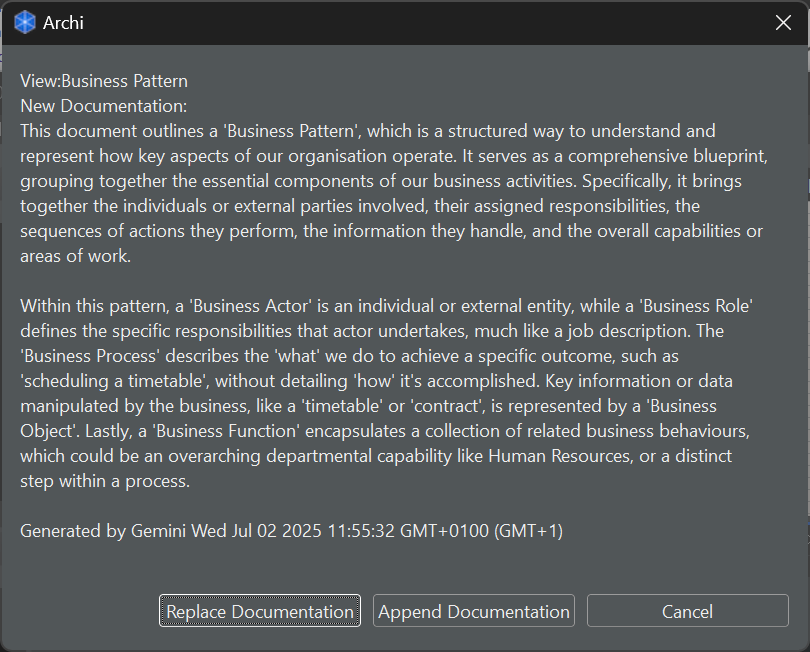
When a “View” (or multiple views) has been selected, this script exports the selected view(s) to Markdown, and summarises the content into two paragraphs, giving the user the option to Replace the Documentation on the view, Append to the current Documentation of the view, or cancel the process.
Component

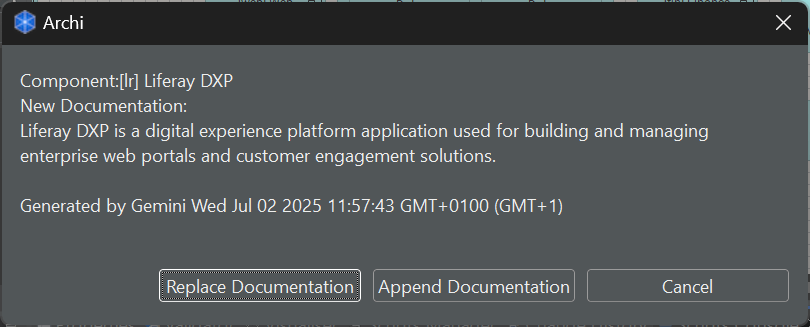
When components have been selected this script attempts to compile all current known “information” about a compontent(s), and then summarises it into a single sentence to populate the Documentation for that component. I’ve found this generally useful for off the shelf “Applications” and “System Software” where I just want a basic description of the software.
Generating an “Analysis” of a Component

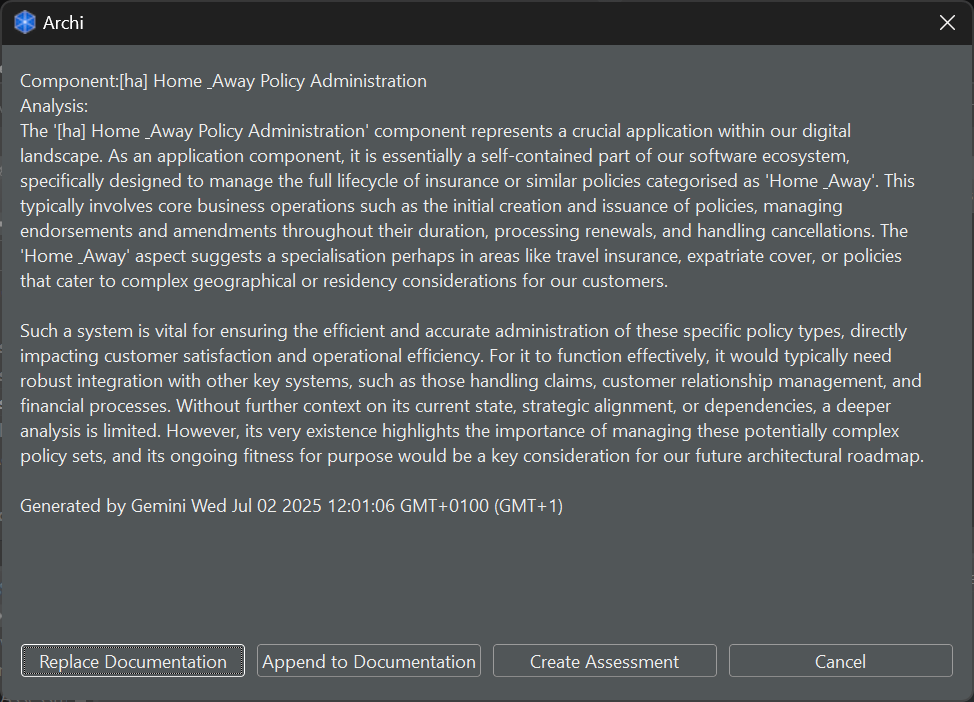
This script first exports the view to Markdown, then prompts the AI to analyse the selected component in the context of the overall diagram. The user is then prompted to either “Replace Documentation”, “Append Documentation” or “Create Analysis”, the final option will then store the generated content into an “Assessment” ArchiMate Element linked to the selected Component
Generate a “Critique” of a View
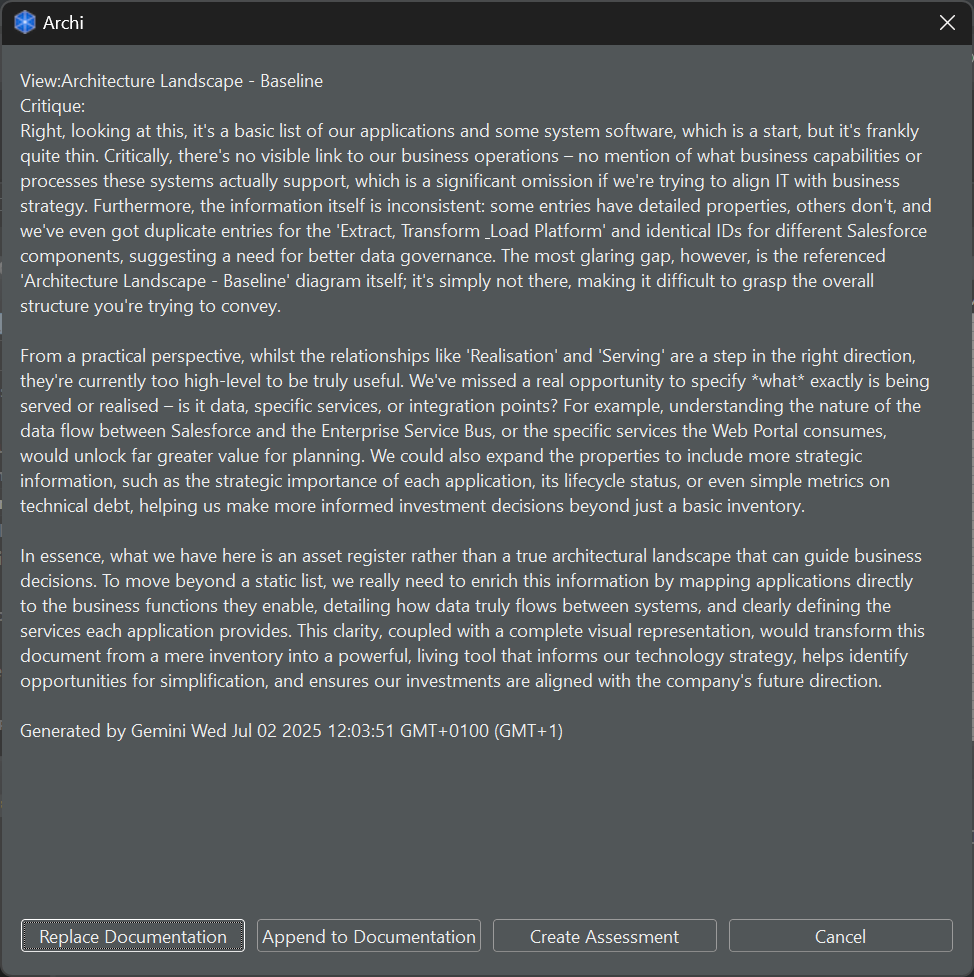
Using a slightly more convoluted prompt, this script exports the view(s) to Markdown, and then provides a few paragraphs covering areas for improvement, opportunities and gaps in the selected view. This script then offers the user to again “Replace Documentation”, “Append Documentation” or “Create Assessment”, with the final option adding an “Assessment” ArchiMate Element to the selected view.
Installing the Scripts
There are three options for using these scripts, either the convoluted “Gemini Java Packages” (which are a pain to import) or an updated “REST API” script which supports either Gemini or Chat GPT.
Gemini AI key via the REST api
First, create your Gemini API Key, once you’ve got your key, update “__DIR__/AI/AI-REST.js” (where __DIR__ is your jArchi scripts folder) script to include the key in line 18:
const geminiKey = "{{INSERT KEY HERE}}";
Then make sure your engine of choice is set on line 22:
const engine = "Gemini";
Once you’ve done that, you should be good to go! (Might need to check that the “other” script files are all importing “./AI-REST.js”)
Chat GPT via the REST api
It’s just as easy with ChatGPT, just create your Open AI Chat GPT key, update “__DIR__/AI/AI-REST.js” (where __DIR__ is your jArchi scripts folder) script to include the key in line 14:
const gptKey = "{{INSERT KEY HERE}}";
Then make sure your engine of choice is set on line 22:
const engine = "GPT";
Once you’ve done that, you should be good to go! (Might need to check that the “other” script files are all importing “./AI-REST.js”)
Gemini AI key and libraries
Behind the scenes, there are a number of steps we need to complete to call the Gemini API. First we need to create a Gemini API key, once you’ve got your key, you’ll need to update the “__DIR__/AI/AI-Gemini.js” (where __DIR__ is your jArchi scripts folder) script to include the key in line 5:
const geminiKey = "{{INSERT KEY HERE}}";
Then we need to grab the java libraries that jArchi needs to call the Gemini API, I’ve listed them below, including links off to the Maven repository for the versions that I downloaded:
- https://repo1.maven.org/maven2/commons-logging/commons-logging/1.3.5/commons-logging-1.3.5.jar
- https://repo1.maven.org/maven2/com/google/auth/google-auth-library-credentials/1.37.1/google-auth-library-credentials-1.37.1.jar
- https://repo1.maven.org/maven2/com/google/auth/google-auth-library-oauth2-http/1.37.1/google-auth-library-oauth2-http-1.37.1.jar
- https://repo1.maven.org/maven2/com/google/genai/google-genai/1.5.0/google-genai-1.5.0.jar
- https://repo1.maven.org/maven2/com/google/guava/guava/33.4.8-jre/guava-33.4.8-jre.jar
- https://repo1.maven.org/maven2/org/apache/httpcomponents/httpclient/4.5/httpclient-4.5.jar
- https://repo1.maven.org/maven2/org/apache/httpcomponents/client5/httpclient5/5.5/httpclient5-5.5.jar
- https://repo1.maven.org/maven2/org/apache/httpcomponents/httpcore/4.4.16/httpcore-4.4.16.jar
- https://repo1.maven.org/maven2/com/fasterxml/jackson/core/jackson-annotations/2.19.1/jackson-annotations-2.19.1.jar
- https://repo1.maven.org/maven2/com/fasterxml/jackson/core/jackson-core/2.19.1/jackson-core-2.19.1.jar
- https://repo1.maven.org/maven2/com/fasterxml/jackson/core/jackson-databind/2.19.1/jackson-databind-2.19.1.jar
- https://repo1.maven.org/maven2/com/fasterxml/jackson/datatype/jackson-datatype-jdk8/2.19.1/jackson-datatype-jdk8-2.19.1.jar
- https://repo1.maven.org/maven2/com/fasterxml/jackson/datatype/jackson-datatype-jsr310/2.19.1/jackson-datatype-jsr310-2.19.1.jar
Once those are downloaded, they go in a nice folder structure like this:
- __DIR__
- /Export to Markdown.ajs
- /AI
- /AI-Gemini.js
- /AI-GenerateAnalysis.ajs
- /AI-GenerateCritique.ajs
- /AI-GenerateDocumentation.ajs
- /jars
- *.jar
Getting the Scripts
All these scripts can be found in the following Gist:
jArchi Gemini API Integration Scripts
| /* | |
| * Generate AI Analysis (Requires AI-REST.js and Export To Markdown.ajs) | |
| * | |
| * Requires: | |
| * * jArchi – https://www.archimatetool.com/blog/2018/07/02/jarchi/ | |
| * * AI-REST.js – Package to support connections to LLM (Gemini/GPT) | |
| * * persona.json – templates for standard persona and prompts – https://gist.github.com/smileham/8cbb3116db7f0ee80bcab4f1a57d14a8#file-persona-json | |
| * * Export to Markdown.ajs – https://gist.github.com/smileham/578bbbb88dc0ed5a1403f3b98711ec25 | |
| * | |
| * Version 1: Gemini API | |
| * Version 1.1: Updated to add Analysis to the view, support for "diagram" components | |
| * Version 1.2: Updated to use latest Markdown – remove TOC | |
| * Version 2: Moved Prompt detail to external "persona.json" file – please download template from the gist package | |
| * | |
| * (c) 2026 Steven Mileham | |
| * | |
| */ | |
| console.show(); | |
| console.clear(); | |
| console.log("Generate AI Summary"); | |
| const library = true; | |
| function getPersona() { | |
| try { | |
| return require(__DIR__ + "persona.json"); | |
| } | |
| catch (e) { | |
| console.error("Persona file not found – check gists"); | |
| exit() | |
| } | |
| } | |
| const personaFile = getPersona(); | |
| const promptTemplate = `${personaFile.analysis.persona}. ${personaFile.analysis.promptTemplate}`; | |
| const strLimit = 3000; | |
| const md = require('../Export To MarkDown.ajs'); | |
| const ai = require('./AI-REST.js'); | |
| const theComponents = $(selection); | |
| function buttonDialog(message,options) { | |
| if (message.length>strLimit) { | |
| message = message.substring(0,strLimit) +"…"; | |
| } | |
| var dialog = new org.eclipse.jface.dialogs.MessageDialog(shell,"Archi",null,message,3,options.concat(["Cancel"]),0); | |
| var result=dialog.open(); | |
| return result==options.length?null:(result+1).toString(); | |
| } | |
| const theView = theComponents.parents("archimate-diagram-model")[0] | |
| if (theView) { | |
| console.log(theView); | |
| let markdownContent = '<document>\n'+md(theView, true, false, false, true, true, false)+"\n</document>"; | |
| theComponents.forEach(theComponent => { | |
| console.log(`Generating Summary for component:${theComponent.name}`); | |
| summary = generateAnalysis (theComponent,markdownContent); | |
| let updateDocumentation = buttonDialog(`Component:${theComponent.name}\nAnalysis:\n${summary}`, ["Replace Documentation", "Append to Documentation", "Create Assessment"]); | |
| if (updateDocumentation=="3") { | |
| let theAnalysis = model.createElement("assessment", `Analysis for ${theComponent.name}`); | |
| theAnalysis.documentation = summary; | |
| if (!theComponent.type.contains("model")) { | |
| let theRelationship = model.createRelationship("association-relationship", "", theComponent.concept, theAnalysis); | |
| let theVisualAnalysis = theView.add(theAnalysis, 0,0,-1,-1); | |
| let theVisualRelationship = theView.add(theRelationship, theComponent, theVisualAnalysis); | |
| } | |
| else | |
| { | |
| let theVisualAnalysis = theView.add(theAnalysis, 0,0, -1, -1); | |
| theView.createConnection(theComponent,theVisualAnalysis); | |
| } | |
| } | |
| else if (updateDocumentation=="2") { | |
| theComponent.documentation += `\n${summary}`; | |
| } | |
| else if (updateDocumentation=="1") { | |
| theComponent.documentation = summary; | |
| } | |
| }); | |
| } | |
| else { | |
| console.log("Please select a component."); | |
| } | |
| function generateAnalysis (theComponent,theContext) { | |
| let componentPrompt = ""; | |
| if (!theComponent.type.contains("model-note")) { | |
| componentPrompt = `Component Name: \"${theComponent.name}\", UID:\"${theComponent.concept.id}\", Component Type: \"${theComponent.type}\"${(theComponent.specialization!=null?", Component Specialisation: \""+theComponent.specialization+"\"":"")}${(theComponent.documentation!=""&&theComponent.documentation!=null)?", Current Documentation: \""+theComponent.documentation+"\"":""}` | |
| theComponent.prop().forEach(function (prop) { | |
| componentPrompt+=` Property: "${prop}" = "${theComponent.prop(prop)}",`; | |
| }) | |
| } | |
| else { | |
| componentPrompt = `"Note: "${theComponent.text}"`; | |
| } | |
| return ai(`${promptTemplate}, analyse ${componentPrompt} in the context of:\n ${theContext}`); | |
| } |
| /* | |
| * Generate AI Critique (Requires AI-Gemini.js and Export To Markdown.ajs) | |
| * | |
| * Requires: | |
| * * jArchi – https://www.archimatetool.com/blog/2018/07/02/jarchi/ | |
| * * AI-REST.js – Package to support connections to LLM (Gemini/GPT) | |
| * * persona.json – templates for standard persona and prompts – https://gist.github.com/smileham/8cbb3116db7f0ee80bcab4f1a57d14a8#file-persona-json | |
| * * Export to Markdown.ajs – https://gist.github.com/smileham/578bbbb88dc0ed5a1403f3b98711ec25 | |
| * | |
| * Version 1: Gemini API | |
| * Version 1.1: Updated to use latest Markdown – remove TOC | |
| * Version 2: Moved Prompt detail to external "persona.json" file – please download template from the gist package | |
| * | |
| * (c) 2026 Steven Mileham | |
| * | |
| */ | |
| console.show(); | |
| console.clear(); | |
| console.log("Generate AI Summary"); | |
| const library = true; | |
| const strLimit = 2000; | |
| const md = require('../Export To MarkDown.ajs'); | |
| const ai = require('./AI-REST.js'); | |
| function getPersona() { | |
| try { | |
| return require(__DIR__ + "persona.json"); | |
| } | |
| catch (e) { | |
| console.error("Persona file not found – check gists"); | |
| exit() | |
| } | |
| } | |
| const personaFile = getPersona(); | |
| const promptTemplate = personaFile.critique.prompt; | |
| const theViews = $(selection).filter("archimate-diagram-model"); | |
| function buttonDialog(message,options) { | |
| if (message.length>strLimit) { | |
| message = message.substring(0,strLimit) +"…"; | |
| } | |
| var dialog = new org.eclipse.jface.dialogs.MessageDialog(shell,"Archi",null,message,3,options.concat(["Cancel"]),0); | |
| var result=dialog.open(); | |
| return result==options.length?null:(result+1).toString(); | |
| } | |
| if (!theViews || theViews.length==0) { | |
| console.log("> Please Select a View"); | |
| } | |
| const theIndexMap = new Map(); | |
| theViews.each(function(theView){ | |
| console.log(`Generating Critique for view:${theView.name}`); | |
| theDocument = ""; | |
| let markdownContent = '<document>\n'+md(theView, true, false, false, true, true, false)+"\n</document>"; | |
| summary = generateCritique (markdownContent); | |
| var updateDocumentation = buttonDialog(`View:${theView.name}\nCritique:\n${summary}`, ["Replace Documentation", "Append to Documentation", "Create Assessment"]); | |
| if (updateDocumentation=="3") { | |
| let theAnalysis = model.createElement("assessment", `Critique for ${theView.name}`); | |
| theAnalysis.documentation = summary; | |
| theView.add(theAnalysis, 10, 200, -1, -1, true); | |
| } | |
| else if (updateDocumentation=="2") { | |
| theView.documentation += `\n${summary}`; | |
| } | |
| else if (updateDocumentation=="1") { | |
| theView.documentation = summary; | |
| } | |
| }); | |
| function generateCritique (markdownContent) { | |
| return ai(promptTemplate+markdownContent); | |
| } |
| /* | |
| * Generate AI Custom Prompt (Requires AI-Gemini.js and Export To Markdown.ajs) | |
| * | |
| * Requires: | |
| * * jArchi – https://www.archimatetool.com/blog/2018/07/02/jarchi/ | |
| * * AI-REST.js – Package to support connections to LLM (Gemini/GPT) | |
| * * persona.json – templates for standard persona and prompts – https://gist.github.com/smileham/8cbb3116db7f0ee80bcab4f1a57d14a8#file-persona-json | |
| * * Export to Markdown.ajs – https://gist.github.com/smileham/578bbbb88dc0ed5a1403f3b98711ec25 | |
| * | |
| * Version 1: Gemini API | |
| * Version 1.1: Updated to use latest Markdown – remove TOC | |
| * Version 2: Moved Prompt detail to external "persona.json" file – please download template from the gist package | |
| * | |
| * (c) 2026 Steven Mileham | |
| * | |
| */ | |
| console.show(); | |
| console.clear(); | |
| console.log("Generate AI Custom Prompt"); | |
| const library = true; | |
| const strLimit = 2000; | |
| const md = require('../Export To MarkDown.ajs'); | |
| const ai = require('./AI-REST.js'); | |
| function getPersona() { | |
| try { | |
| return require(__DIR__ + "persona.json"); | |
| } | |
| catch (e) { | |
| console.error("Persona file not found – check gists"); | |
| exit() | |
| } | |
| } | |
| const personaFile = getPersona(); | |
| let persona = personaFile.custom.persona; | |
| let promptTemplate = personaFile.custom.promptTemplate; | |
| let suffix = personaFile.custom.suffix; | |
| const theViews = $(selection).filter("archimate-diagram-model"); | |
| function buttonDialog(message,options) { | |
| if (message.length>strLimit) { | |
| message = message.substring(0,strLimit) +"…"; | |
| } | |
| var dialog = new org.eclipse.jface.dialogs.MessageDialog(shell,"Archi",null,message,3,options.concat(["Cancel"]),0); | |
| var result=dialog.open(); | |
| return result==options.length?null:(result+1).toString(); | |
| } | |
| if (!theViews || theViews.length==0) { | |
| console.log("> Please Select a View"); | |
| } | |
| const theIndexMap = new Map(); | |
| persona = window.prompt("Enter Persona", persona); | |
| if (persona == null) { | |
| console.log("Persona dialog cancelled. Exiting."); | |
| exit(); | |
| } | |
| let prompt = window.prompt("Enter Prompt", promptTemplate); | |
| if (prompt == null) { | |
| console.log("Prompt dialog cancelled. Exiting."); | |
| exit(); | |
| } | |
| suffix = window.prompt("Enter Suffix", suffix); | |
| if (suffix == null) { | |
| console.log("Suffix dialog cancelled. Exiting."); | |
| exit(); | |
| } | |
| const thePrompt = `${persona}, ${prompt}. ${suffix}`; | |
| theViews.each(function(theView){ | |
| console.log(`Generating Custom Prompt for view:${theView.name}`); | |
| theDocument = ""; | |
| let markdownContent = '<document>\n'+md(theView, true, false, false, true, true, false)+"\n</document>"; | |
| summary = generateResponse (thePrompt, markdownContent); | |
| var updateDocumentation = buttonDialog(`View:${theView.name}\nResponse:\n${summary}`, ["Replace Documentation", "Append to Documentation", "Create Assessment"]); | |
| if (updateDocumentation=="3") { | |
| let theAnalysis = model.createElement("assessment", `Response for ${theView.name}`); | |
| theAnalysis.documentation = `${thePrompt}\n\n${summary}`; | |
| theView.add(theAnalysis, 10, 200, -1, -1, true); | |
| } | |
| else if (updateDocumentation=="2") { | |
| theView.documentation += `\n${summary}`; | |
| } | |
| else if (updateDocumentation=="1") { | |
| theView.documentation = summary; | |
| } | |
| }); | |
| function generateResponse (prompt, markdownContent) { | |
| return ai(prompt+markdownContent); | |
| } |
| /* | |
| * Generate AI Documentation (Requires AI-Gemini.js and Export To Markdown.ajs) | |
| * | |
| * Requires: | |
| * * jArchi – https://www.archimatetool.com/blog/2018/07/02/jarchi/ | |
| * * AI-REST.js – Package to support connections to LLM (Gemini/GPT) | |
| * * persona.json – templates for standard persona and prompts – https://gist.github.com/smileham/8cbb3116db7f0ee80bcab4f1a57d14a8#file-persona-json | |
| * * Export to Markdown.ajs – https://gist.github.com/smileham/578bbbb88dc0ed5a1403f3b98711ec25 | |
| * | |
| * Version 1: Gemini API | |
| * Version 1.1: Updated to use latest Markdown – remove TOC | |
| * | |
| * (c) 2026 Steven Mileham | |
| * | |
| */ | |
| console.show(); | |
| console.clear(); | |
| console.log("Generate AI Summary"); | |
| const library = true; | |
| const strLimit = 3000; | |
| const md = require('../Export To MarkDown.ajs'); | |
| const ai = require('./AI-REST.js'); | |
| function getPersona() { | |
| try { | |
| return require(__DIR__ + "persona.json"); | |
| } | |
| catch (e) { | |
| console.error("Persona file not found – check gists"); | |
| exit() | |
| } | |
| } | |
| const personaFile = getPersona(); | |
| const persona = personaFile.documentation.persona; | |
| const viewPromptTemplate = `${persona}. ${personaFile.documentation.viewPromptTemplate}`; | |
| const componentPromptTemplate = `${persona}. ${personaFile.documentation.componentPromptTemplate}`; | |
| const theComponents = $(selection); | |
| const theViews = theComponents.filter("archimate-diagram-model"); | |
| function buttonDialog(message,options) { | |
| if (message.length>strLimit) { | |
| message = message.substring(0,strLimit) +"…"; | |
| } | |
| var dialog = new org.eclipse.jface.dialogs.MessageDialog(shell,"Archi",null,message,3,options.concat(["Cancel"]),0); | |
| var result=dialog.open(); | |
| return result==options.length?null:(result+1).toString(); | |
| } | |
| if (theViews && theViews.length>0) { | |
| theViews.each(function(theView){ | |
| console.log(`Generating Summary for view:${theView}`); | |
| theDocument = ""; | |
| let markdownContent = '<document>\n'+md(theView, true, false, false, true, true, false)+"\n</document>"; | |
| summary = summariseMarkdownToAI (markdownContent); | |
| var updateDocumentation = buttonDialog(`View:${theView.name}\nNew Documentation:\n${summary}`, ["Replace Documentation", "Append Documentation"]); | |
| if (updateDocumentation=="2") { | |
| theView.documentation += `\n${summary}`; | |
| } | |
| else if (updateDocumentation=="1") { | |
| theView.documentation = summary; | |
| } | |
| }); | |
| } | |
| else { | |
| theComponents.forEach(theComponent => { | |
| console.log(`Generating Summary for component:${theComponent.name}`); | |
| summary = generateDocumentation (theComponent); | |
| var updateDocumentation = buttonDialog(`Component:${theComponent.name}\nNew Documentation:\n${summary}`, ["Replace Documentation", "Append Documentation"]); | |
| if (updateDocumentation=="2") { | |
| theComponent.documentation += `\n${summary}`; | |
| } | |
| else if (updateDocumentation=="1") { | |
| theComponent.documentation = summary; | |
| } | |
| }); | |
| } | |
| function generateDocumentation (theComponent) { | |
| let componentPrompt = `Component Name: \"${theComponent.name}\", Component Type: \"${theComponent.type}\"${(theComponent.specialization!=null?", Component Specialisation: \""+theComponent.specialization+"\"":"")}${(theComponent.documentation!=""&&theComponent.documentation!=null)?", Current Documentation: \""+theComponent.documentation+"\"":""}` | |
| theComponent.prop().forEach(function (prop) { | |
| componentPrompt+=` Property: "${prop}" = "${theComponent.prop(prop)}",`; | |
| }) | |
| return ai(`${componentPromptTemplate}:\n ${componentPrompt}`); | |
| } | |
| function summariseMarkdownToAI (markdownContent) { | |
| return ai(viewPromptTemplate+markdownContent) | |
| } |
| /* | |
| * AI Support package | |
| * | |
| * Requires: | |
| * * jArchi – https://www.archimatetool.com/blog/2018/07/02/jarchi/ | |
| * | |
| * Gemini API Key – https://ai.google.dev/gemini-api/docs/api-key | |
| * ChatGPT Key – https://platform.openai.com/docs/overview | |
| * | |
| * Version 1: Gemini API | |
| * Version 2: Chat GPT + REST API usage | |
| * Version 3: Introduce "Engine Picker" | |
| * Version 4: Grok API | |
| * Version 4.1: Removed "Keys" from code – added to external "config.json" | |
| * Version 4.1.1: Added some dialogs | |
| * Version 5: Claude API | |
| * Version 5.1: Gemini 3 Pro | |
| * | |
| * (c) 2026 Steven Mileham | |
| * | |
| */ | |
| let geminiEndpoint = "https://generativelanguage.googleapis.com/v1beta/models/gemini-2.5-flash:generateContent"; | |
| const gptEndpoint = "https://api.openai.com/v1/responses"; | |
| const grokEndpoint = "https://api.x.ai/v1/chat/completions"; | |
| const claudeEndpoint = "https://api.anthropic.com/v1/messages"; | |
| const timeOut = 300000 | |
| console.log("Getting AI Keys"); | |
| const grokModels = ["Grok-4-Latest","Grok-3-Mini","Grok-Code-Fast-1"]; | |
| const gptModels = ["GPT-4.1", "GPT-5"]; | |
| const geminiModels = ["Gemini-3-Pro-Preview","Gemini-2.5-Flash", "Gemini-2.5-Pro", "Gemini-2.5-Flash-Lite"]; | |
| const claudeModels = ["Claude-Sonnet-4-5", "Claude-Haiku-4-5", "Claude-Opus-4-1"]; | |
| function getConfig() { | |
| try { | |
| return require(__DIR__ + "config.json"); | |
| } | |
| catch (e) { | |
| console.error("Config not found – Creating 'config.json'"); | |
| const grokKey = window.prompt("Please enter Grok API key",""); | |
| const geminiKey = window.prompt("Please enter Gemini API key",""); | |
| const gptKey = window.prompt("Please enter ChatGPT API Key",""); | |
| const claudeKey = window.prompt("Please enter Claude API Key",""); | |
| const theConfig = `{\n"grokKey":"${grokKey==null?"":grokKey}",\n"geminiKey":"${geminiKey==null?"":geminiKey}",\n"gptKey": "${gptKey==null?"":gptKey}",\n"claudeKey":${claudeKey==null?"":claudeKey}"\n}` | |
| $.fs.writeFile(__DIR__ + "config.json", theConfig); | |
| return JSON.parse(theConfig); | |
| } | |
| } | |
| const config = getConfig(); | |
| const gptKey = config.gptKey; | |
| const geminiKey = config.geminiKey; | |
| const grokKey = config.grokKey; | |
| const claudeKey = config.claudeKey; | |
| console.log("Loaded AI REST Package"); | |
| function listSelection(title, choices) { | |
| var ListSelectionDialog = Java.type("org.eclipse.ui.dialogs.ListSelectionDialog"); | |
| var LabelProvider = Java.type('org.eclipse.jface.viewers.LabelProvider'); | |
| var ArrayContentProvider = Java.type('org.eclipse.jface.viewers.ArrayContentProvider'); | |
| var dialog = new ListSelectionDialog(shell, choices, ArrayContentProvider.getInstance(), | |
| new LabelProvider(), title); | |
| dialog.open(); | |
| result = dialog.getResult(); | |
| return result ? new String(result) : null; | |
| } | |
| function callApi(url, payload, engine) { | |
| var imports = new JavaImporter(java.net, java.util, java.lang, java.io); | |
| var apiResult = ""; | |
| let result= {}; | |
| with (imports) { | |
| var urlObj = new URL(url); | |
| var hcon = urlObj.openConnection(); | |
| hcon.setConnectTimeout(timeOut); | |
| hcon.setReadTimeout(timeOut); | |
| hcon.setRequestMethod("POST"); | |
| hcon.setDoOutput(true); | |
| // Set request headers | |
| hcon.setRequestProperty("Content-Type", "application/json"); | |
| hcon.setRequestProperty("Accept", "application/json"); | |
| hcon.setRequestProperty("Accept-Charset", "UTF-8"); | |
| if (engine == "Gemini") { | |
| hcon.setRequestProperty("x-goog-api-key", geminiKey); | |
| } | |
| else if (engine == "GPT") { | |
| hcon.setRequestProperty("Authorization", `Bearer ${gptKey}`); | |
| } | |
| else if (engine == "Grok") { | |
| hcon.setRequestProperty("Authorization", `Bearer ${grokKey}`); | |
| } | |
| else if (engine == "Claude") { | |
| hcon.setRequestProperty("x-api-key", claudeKey); | |
| hcon.setRequestProperty("anthropic-version","2023-06-01"); | |
| } | |
| try { | |
| var output = new OutputStreamWriter(hcon.getOutputStream()); | |
| output.write(JSON.stringify(payload)); | |
| output.flush(); | |
| output.close(); | |
| } catch(e) { | |
| console.error("Error writing POST data:"); | |
| console.error(e); | |
| exit(); | |
| } | |
| try { | |
| var reader = new BufferedReader(new InputStreamReader(hcon.getInputStream())); | |
| var line = reader.readLine(); | |
| while (line != null) { | |
| apiResult += line + "\n"; | |
| line = reader.readLine(); | |
| } | |
| reader.close(); | |
| result = JSON.parse(apiResult); | |
| switch(engine) { | |
| case "Gemini": | |
| if (!result.candidates) { | |
| console.error ("Error"); | |
| console.log(apiResult); | |
| } | |
| break; | |
| case "GPT": | |
| if (!result.output[0]) { | |
| console.error ("Error"); | |
| console.log(apiResult); | |
| } | |
| break; | |
| case "Grok": | |
| if (!result.choices[0]) { | |
| console.error ("Error"); | |
| console.log(apiResult); | |
| } | |
| break; | |
| default: | |
| } | |
| } catch (e) { | |
| console.error("HTTPS error:"); | |
| console.error(e); | |
| console.error(hcon.getHeaderFields()); | |
| exit(); | |
| } | |
| } | |
| if (engine=="Gemini") { | |
| return result.candidates[0].content.parts[0].text | |
| } | |
| else if (engine=="GPT") { | |
| for (const num in result.output) { | |
| if (result.output[num].type=="message") { | |
| return result.output[num].content[0].text; | |
| } | |
| } | |
| } | |
| else if (engine=="Grok") { | |
| return result.choices[0].message.content; | |
| } | |
| else if (engine=="Claude") { | |
| return result.content[0].text; | |
| } | |
| return ""; | |
| } | |
| const sendToAI = (thePrompt) => { | |
| let theOptions = []; | |
| if (gptKey) { | |
| theOptions.push(…gptModels); | |
| } | |
| if (geminiKey) { | |
| theOptions.push(…geminiModels); | |
| } | |
| if (grokKey) { | |
| theOptions.push(…grokModels); | |
| } | |
| if (claudeKey) { | |
| theOptions.push(…claudeModels); | |
| } | |
| let aiOutput = ""; | |
| const options = listSelection("Options", theOptions); | |
| if (options=="" || options==null) { | |
| exit(); | |
| } | |
| const engine = options.includes("GPT")?"GPT":options.includes("Gemini")?"Gemini":options.includes("Grok")?"Grok":"Claude"; | |
| //console.log(thePrompt); | |
| if (engine == "Gemini") { | |
| console.log("Asking Gemini. Please Wait…"); | |
| geminiEndpoint = `https://generativelanguage.googleapis.com/v1beta/models/${options.toLowerCase()}:generateContent`; | |
| let data = { | |
| "contents" : { | |
| "parts" : [ | |
| { | |
| "text": thePrompt | |
| } | |
| ] | |
| } | |
| }; | |
| aiOutput = callApi(geminiEndpoint,data,engine); | |
| } | |
| else if (engine == "GPT") { | |
| console.log("Asking ChatGPT. Please Wait…"); | |
| let data = { | |
| "model": options.toLowerCase(), | |
| "input": thePrompt | |
| }; | |
| aiOutput = callApi(gptEndpoint,data,engine); | |
| } | |
| else if (engine == "Grok") { | |
| console.log("Asking Grok. Please Wait…"); | |
| let data = { | |
| "messages": [ | |
| { | |
| "role": "system", | |
| "content": "You are a plugin to the Archi application to provide AI Analysis of ArchiMate models." | |
| }, | |
| { | |
| "role": "user", | |
| "content": thePrompt | |
| } | |
| ], | |
| "model": options.toLowerCase(), | |
| "stream": false, | |
| "temperature": 0 | |
| } | |
| aiOutput = callApi(grokEndpoint, data, engine); | |
| } | |
| else if (engine == "Claude") { | |
| console.log("Asking Claude. Please Wait…"); | |
| let data = { | |
| "model": options.toLowerCase(), | |
| "max_tokens": 1024, | |
| "messages": [ | |
| { | |
| "role": "user", | |
| "content": thePrompt | |
| } | |
| ] | |
| }; | |
| aiOutput = callApi(claudeEndpoint,data,engine); | |
| } | |
| return `${aiOutput}\n\nGenerated by ${options} ${new Date().toLocaleString()}`; | |
| } | |
| module.exports=sendToAI; |
| /* | |
| * AI Support package | |
| * | |
| * WARNING: Use the new one below! | |
| * An alternative file below "AI-REST.js", enables both Gemini or Chat GPT via REST API's without the Java jar packages being loaded. | |
| * | |
| * Requires: | |
| * * jArchi – https://www.archimatetool.com/blog/2018/07/02/jarchi/ | |
| * * Gemini API Java Libraries: | |
| * * https://repo1.maven.org/maven2/commons-logging/commons-logging/1.3.5/commons-logging-1.3.5.jar | |
| * * https://repo1.maven.org/maven2/com/google/auth/google-auth-library-credentials/1.37.1/google-auth-library-credentials-1.37.1.jar | |
| * * https://repo1.maven.org/maven2/com/google/auth/google-auth-library-oauth2-http/1.37.1/google-auth-library-oauth2-http-1.37.1.jar | |
| * * https://repo1.maven.org/maven2/com/google/genai/google-genai/1.5.0/google-genai-1.5.0.jar | |
| * * https://repo1.maven.org/maven2/com/google/guava/guava/33.4.8-jre/guava-33.4.8-jre.jar | |
| * * https://repo1.maven.org/maven2/org/apache/httpcomponents/httpclient/4.5/httpclient-4.5.jar | |
| * * https://repo1.maven.org/maven2/org/apache/httpcomponents/client5/httpclient5/5.5/httpclient5-5.5.jar | |
| * * https://repo1.maven.org/maven2/org/apache/httpcomponents/httpcore/4.4.16/httpcore-4.4.16.jar | |
| * * https://repo1.maven.org/maven2/com/fasterxml/jackson/core/jackson-annotations/2.19.1/jackson-annotations-2.19.1.jar | |
| * * https://repo1.maven.org/maven2/com/fasterxml/jackson/core/jackson-core/2.19.1/jackson-core-2.19.1.jar | |
| * * https://repo1.maven.org/maven2/com/fasterxml/jackson/core/jackson-databind/2.19.1/jackson-databind-2.19.1.jar | |
| * * https://repo1.maven.org/maven2/com/fasterxml/jackson/datatype/jackson-datatype-jdk8/2.19.1/jackson-datatype-jdk8-2.19.1.jar | |
| * * https://repo1.maven.org/maven2/com/fasterxml/jackson/datatype/jackson-datatype-jsr310/2.19.1/jackson-datatype-jsr310-2.19.1.jar | |
| * | |
| * Gemini API Key – https://ai.google.dev/gemini-api/docs/api-key | |
| * | |
| * Version 1: Gemini API | |
| * | |
| * (c) 2025 Steven Mileham | |
| * | |
| */ | |
| const geminiKey = "{{INSERT KEY HERE}}"; | |
| Java.addToClasspath(__DIR__ +"/jars/google-genai-1.5.0.jar"); | |
| Java.addToClasspath(__DIR__ +"/jars/jackson-core-2.19.1.jar"); | |
| Java.addToClasspath(__DIR__ +"/jars/jackson-databind-2.19.1.jar"); | |
| Java.addToClasspath(__DIR__ +"/jars/guava-33.4.8-jre.jar"); | |
| Java.addToClasspath(__DIR__ +"/jars/httpclient-4.5.14.jar"); | |
| Java.addToClasspath(__DIR__ +"/jars/httpcore-4.4.16.jar"); | |
| Java.addToClasspath(__DIR__ +"/jars/google-auth-library-credentials-1.37.1.jar"); | |
| Java.addToClasspath(__DIR__ +"/jars/google-auth-library-oauth2-http-1.37.1.jar"); | |
| Java.addToClasspath(__DIR__ +"/jars/jackson-datatype-jdk8-2.19.1.jar"); | |
| Java.addToClasspath(__DIR__ +"/jars/jackson-datatype-jsr310-2.19.1.jar"); | |
| Java.addToClasspath(__DIR__ +"/jars/jackson-annotations-2.19.1.jar"); | |
| Java.addToClasspath(__DIR__ +"/jars/commons-logging-1.3.5.jar"); | |
| console.log("Loaded Gemini Package") | |
| const sendToAI = (thePrompt) => { | |
| var client = Java.type("com.google.genai.Client"); | |
| let theclient = client.builder().apiKey(geminiKey).build(); | |
| let response = | |
| theclient.models.generateContent( | |
| "gemini-2.5-flash", | |
| `${thePrompt}`, | |
| null); | |
| let aiOutput = response.text(); | |
| return `${aiOutput}\n\nGenerated by Gemini ${new Date().toLocaleString()}`; | |
| } | |
| module.exports=sendToAI; |
| { | |
| "documentation": { | |
| "persona": "As a friendly Enterprise Architect trained in TOGAF and ArchiMate", | |
| "viewPromptTemplate": "Using language which can be understood by the business in British English, summarise the following documentation into no more than two paragraphs. This model is an export from an Archimate model converted to Markdown format, an element may appear multiple times in the document, but will have a consistent UID. Do not greet the user, do not refer to the \"document\", the summary will be stored against the document for future users:\n", | |
| "componentPromptTemplate" :"Using language which can be understood by the business in British English, summarise the following component into one sentence, include product details if this is a application, service or device. Do not greet the user, do not refer to the \"component type\" or \"UID\" in the summary, the summary will be stored against the component for future users" | |
| }, | |
| "critique": { | |
| "prompt": "You are three Enterprise Architects trained in TOGAF and ArchiMate, one critical, one friendly and one neutral, using language which can be understood by the business in British English, critique the following architecture, highlight areas for improvement, missed opportunities, inconsistencies and any gaps. This model is an export from an Archimate model converted to Markdown format, an element may appear multiple times in the document, but will have a consistent UID. Do not greet the user, do not reference any 'missing' diagram, summarise your output into no more than three paragraphs followed by a bulletpointed action plan to resolve the issues:\n" | |
| }, | |
| "analysis": { | |
| "persona": "As a friendly Enterprise Architect trained in TOGAF and ArchiMate", | |
| "promptTemplate": "Using language which can be understood by the business in British English, analyse the following component. This model is an export from an Archimate model converted to Markdown format, an element may appear multiple times in the document, but will have a consistent UID. Do not greet the user, do not refer to the \"component type\" or \"UID\" in the summary, the summary will be stored against the component for future users, summarise the analysis in no more than two paragraphs" | |
| }, | |
| "custom": { | |
| "persona": "As a friendly Enterprise Architect trained in TOGAF and ArchiMate", | |
| "promptTemplate" : "Do something awesome with this document", | |
| "suffix": "This model is an export from an Archimate model converted to Markdown format, an element may appear multiple times in the document, but will have a consistent UID. Do not greet the user, the response will be stored against the view for future users." | |
| } | |
| } |
 General Geekery
Thank you very much for your excellent and highly practical educational content. I greatly enjoy exploring your scripts, particularly this one, and have successfully set them all up and running.
However, I encountered an issue in the GenerateAnalysis.ajs script. The following line throws an error:
let theRelationship = model.createRelationship(“association-relationship”, “”, theComponent.concept, theAnalysis);
While the theAnalysis element is created without issue, jArchi fails to establish a relationship between it and the selected component. The error indicates that the arguments are incompatible with the default overloads of createRelationship method.
Please note that both the views and models are based on the most recent standard case studies provided in The Open Group case studies. So the model and the selected elements are totally fine.
LikeLike
Good spot!
I’ve updated the script to support “Diagram” elements, and to insert the Analysis into the View.
Give it a shot.
LikeLike
Thanks for sharing, as always excellent work.
Lately I have used Archi less because I have not find good ways of integrating LLMs with it.
Question: Does the LLM use actual PNG-images for the analysis?
LikeLike
Hey Daniel!
In these scripts, the LLM is actually interpreting the model based on an export to Markdown first. I’ve had great success myself with these scripts, just using them to summarise, etc.
I’ve also used the “Export to Markdown” script to load into NotebookLM very successfully in order to “interrogate” the model that way.
LikeLike
Okay, so all the relations etc. are actually described in text in the markdown?
So the LLM does not have to interpret images?
LikeLike
Absolutely, I’ve uploaded the “Markdown” generated by the “Export to Markdown.ajs” script, which is used by the LLM here: https://gist.github.com/smileham/c8be2711e03419f78ca592aae57c59f7
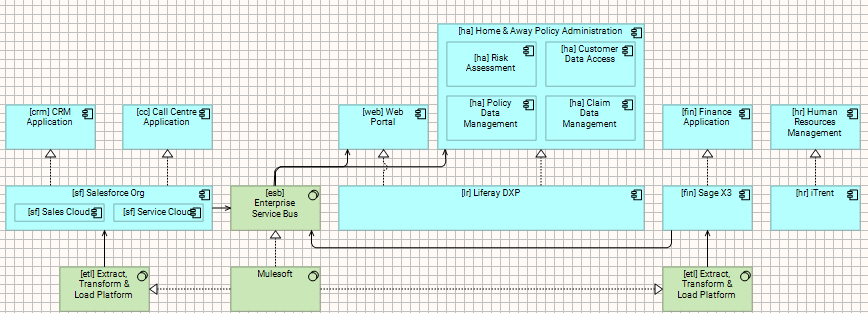
In short, each “Component” will have a heading in the “document”, and there is a relationship table to describe the inbound/outbound (and hidden) relationships, that looks something like this:
|UID|From|Relationship|To|Name/Label|Description|

|---|---|---|---|---|---|

|_0ab9df5c-fe93-4d7f-82eb-67264c81776b|[lr] Liferay DXP (Application Component)|Realization Relationship|[[ha] Home & Away Policy Administration (Application Component)](#ha-home-&-away-policy-administration-application-component)|||

|_4bb87553-7878-4584-bf37-d0db0ec5c316|[lr] Liferay DXP (Application Component)|Realization Relationship|[[web] Web Portal (Application Component)](#web-web-portal-application-component)|||
LikeLike
Great 🙂
Question: Is there a possibility to export the whole model as markdown? Or only a view?
LikeLike
I’ve not enabled an “entire model” to Markdown, but you can select multiple views using the “Export to Markdown” script.
When you use the script with multiple views, you have two options, the default is to export each selected view to a seperate Markdown file, or you can select the “Generate a Single Document from the selected views” option, which will export them all to one file.
I use this option to extract artefacts like my overall Architecture Baseline, the Roadmap, and a number of “Data Model” views, which I have then successfully imported into NotebookLM and Gemini Gems to enable as an EA Chatbot that I share out to Business Analysts, etc…
LikeLike